Nice and fast support. The script quality is amazing and works perfectly.
Premium Script
PRESENCE UI

Product Description
🎮 DBN Presence UI – Premium Discord Rich Presence Manager for FiveM
DBN Presence UI is a professional, all-in-one Discord Rich Presence configuration system for modern FiveM servers. It allows server administrators to fully manage and customize their Discord presence directly in-game, with real-time updates, a modern interface, and powerful customization options.
Perfect for RP servers, serious communities, and developers who want a premium Discord presence experience without complexity.
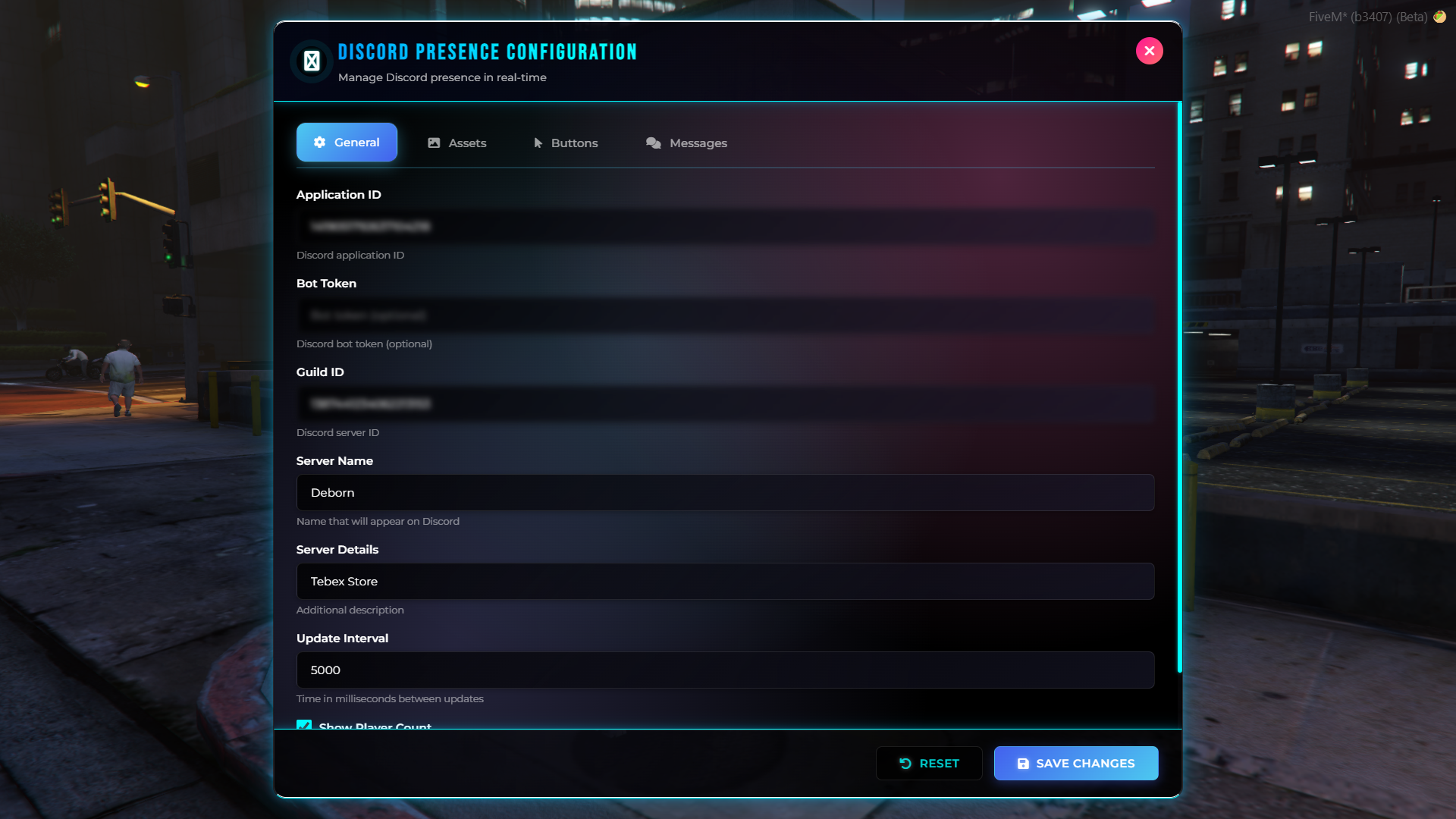
🚀 WHY CHOOSE DBN PRESENCE UI?
✅ Real-time configuration (no server restarts required)
✅ Modern and intuitive in-game UI
✅ Full configuration without leaving the game
✅ Multi-language support
✅ Compatible with major FiveM frameworks
✅ Real-time player count display
✅ Dynamic rotating messages
✅ Custom Discord assets and buttons
✅ Admin-only permission system
✅ Optimized and production-ready
🎯 CORE FEATURES
📋 Real-Time Configuration Interface
Open the UI using /presence or /presenceui and configure your Discord Rich Presence instantly.
All changes are applied immediately.
🎨 Modern Tabbed Interface
Cleanly organized into easy-to-use sections:
General – Application ID, server name, details, update interval
Assets – Large and small Discord assets with custom hover text
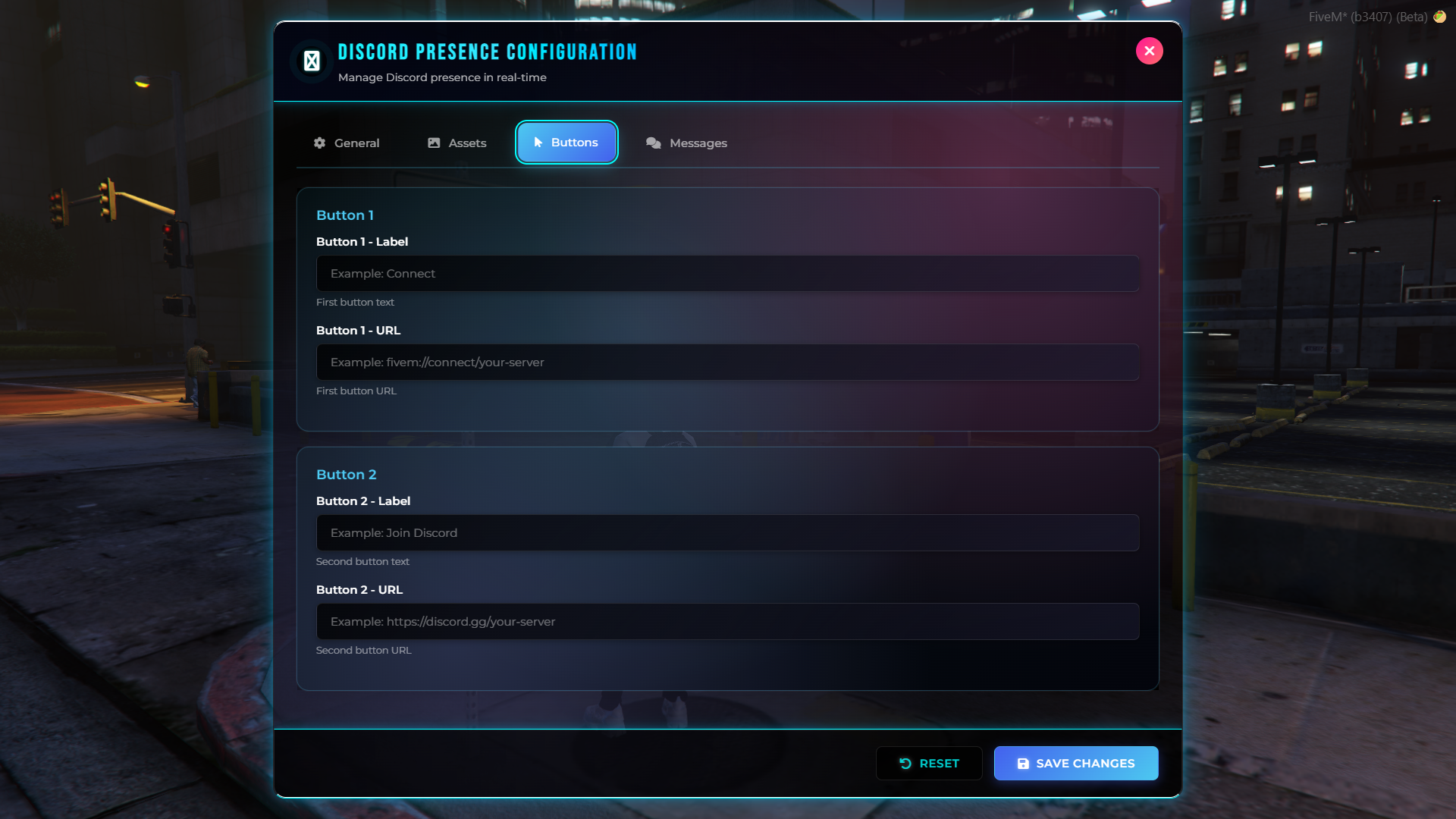
Buttons – Up to two customizable buttons with custom URLs
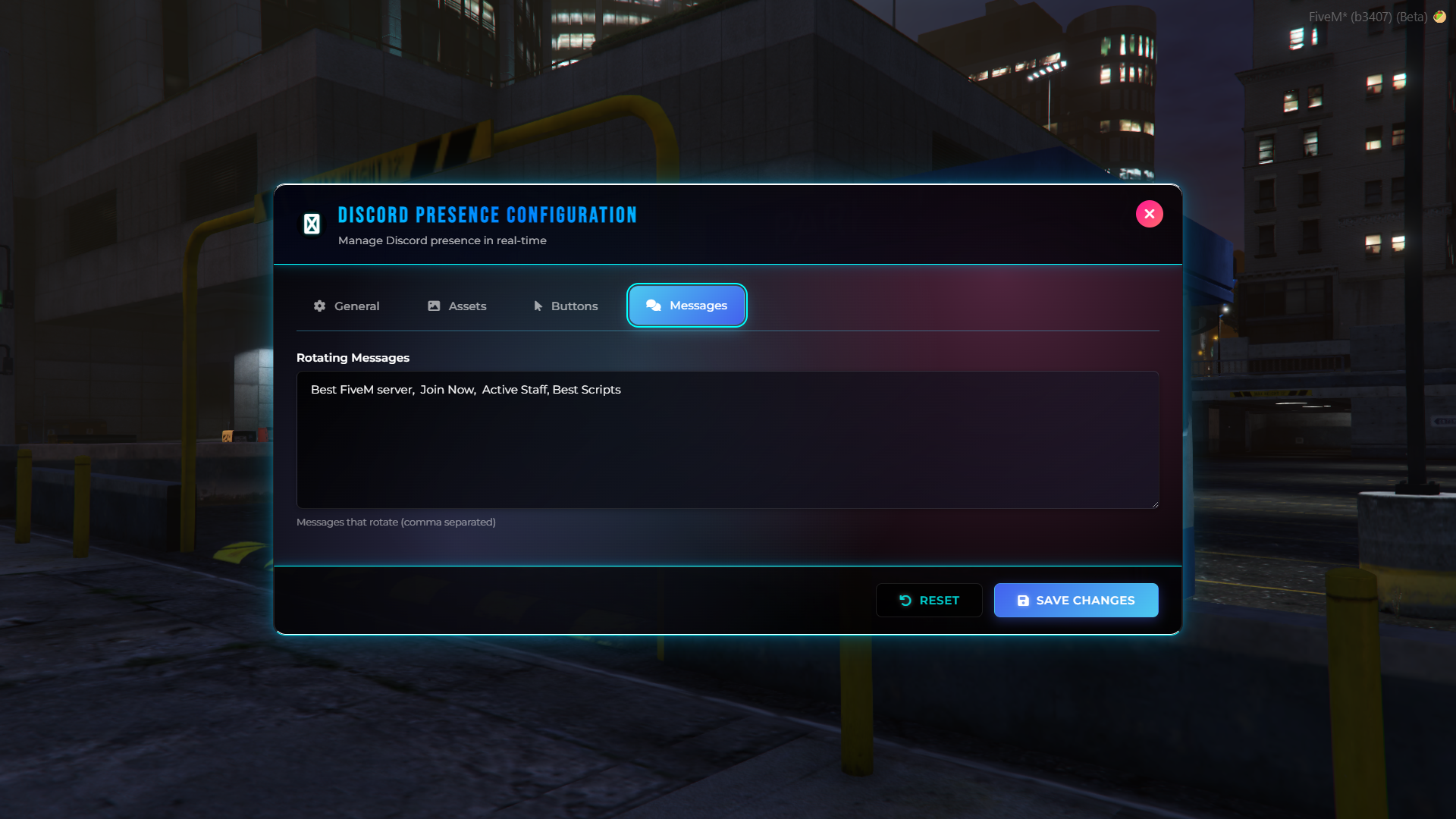
Messages – Rotating message system
🌍 Multi-Language Support
Built-in language support:
🇪🇸 Spanish
🇬🇧 English
🇫🇷 French
🇩🇪 German
🇮🇹 Italian
🇵🇹 Portuguese
The language can be changed from the configuration file and the UI updates automatically.
🔄 Rotating Messages System
Add multiple messages that automatically rotate, keeping your Discord presence fresh and engaging.
Example:Welcome, Join now, Serious RP Server
👥 Player Count Integration
Optionally display the number of online players in real time directly in your Discord Rich Presence.
🖼️ Custom Discord Assets
Configure large and small Discord images with custom hover text to reinforce your server’s branding and identity.
🔘 Action Buttons
Add up to two interactive buttons to your Discord Rich Presence:
Direct FiveM connect link
Discord invite link
Any custom URL
🔐 Permission System
Access to the configuration interface is restricted to authorized administrators only.
⚡ Automatic Framework Compatibility
The script automatically adapts to your server environment:
ESX
QB-Core
QBox
Standalone
🎨 MODERN & INTUITIVE UI
Sleek, responsive design built for speed and usability.
Includes:
✅ Real-time field validation
✅ Success and error notifications
✅ Smooth animations
✅ Keyboard shortcut (ESC to close)
✅ Responsive layout
✅ Accessibility-friendly
⚙️ DEVELOPER-FRIENDLY DESIGN
Clean and maintainable architecture:
Modular structure
Event-driven system
Error handling
Optimized performance
Clean codebase
🔐 SECURITY & PERFORMANCE
Full input validation
Admin-only access control
Anti-abuse protection
Minimal resource usage
Stable and secure execution
📦 REQUIREMENTS
Compatible FiveM framework or Standalone mode
Updated FiveM server
Discord Application (for Application ID)
🚀 INSTALLATION
Place the resource in your resources folder
Add it to your
server.cfgConfigure the desired language
Restart the server
Open the UI using /presence or /presenceui
📖 BASIC USAGE
Create or select a Discord Application
Copy your Application ID
Configure general server settings
Set up assets and buttons
Add rotating messages
Save changes
👉 Changes apply instantly.
🎉 FINAL WORDS
DBN Presence UI is more than a Discord Rich Presence script — it’s a complete real-time configuration system.
It gives you full control, a modern interface, and a professional Discord presence without ever leaving the game.
If you want a powerful, elegant, and easy-to-use Discord Rich Presence manager for your FiveM server, DBN Presence UI is the right choice.
📝 SUPPORT
For support, bug reports, or feature requests, please contact the developer or visit the official Discord server.
Purchase Options
Secure Payment
-100% OFF
FREE
Join the Community
Key Features
Premium Quality
24/7 Support
Regular Updates
Easy Installation
Community Reviews
Very customizable and easy to integrate. Highly recommended.
Fast service and clean delivery. Great premium experience.
I bought this script for my FiveM server and it was worth it. Clean interface, easy to understand, and works exactly as promised.
DBN support jumped in immediately and fixed everything fast. Beautiful UI and one of the best systems I have used.
Amazing support and very detailed scripts. Totally recommended.
Recent Payments
Recent Payments
-

Redfield_Roleplay - WEATHER SYSTEM v3.0
29.99 EUR -

HITMANSAINT - WEATHER SYSTEM v3.0
33.99 USD -

Hadtseflats - WHITELIST PANEL
9.99 EUR -

TacticalPinup - DBN HALLOWEEN
22.99 USD -

ZAYN1312 - WEATHER SYSTEM v3.0
29.99 EUR -

NulledByte - LIFE CREATOR v2.0
74.99 USD -

Rodrigues_Danyl - WHITELIST PANEL
9.99 EUR -

StLKronic - NPC PLACER v2.0
34.99 USD -

Gaian2024 - PROP CREATOR
29.99 EUR -

LivingCoastalRP - WEATHER SYSTEM v3.0
34.99 USD -

servertest99 - WEATHER SYSTEM v3.0
29.99 EUR -

DadJokes4All - NPC PLACER v2.0
57.99 USD -
ParisDestinRP - WEATHER SYSTEM v3.0
29.99 EUR -

LSALand - PROP CREATOR
57.99 USD -

Ludmila1228 - WEATHER SYSTEM v3.0
29.99 EUR -

FilletKastro_2K - LIFE CREATOR v2.0
44.99 USD -

VisionThaGoat - PROP CREATOR
34.79 USD -

LIMMA98 - WEATHER SYSTEM v3.0
17.99 EUR -

WSWS - PROP CREATOR
29.99 EUR -

bajszrilla - WEATHER SYSTEM v3.0
17.99 EUR